
The free GeoTag Tool for photos is a simple online tool that allows you to add GPS location, description and keywords stored directly in EXIF metadata to image files. This makes photos readable not only for users, but also for search engines such as Google.
Many companies publish good-quality photos that are completely unused from an SEO point of view – with no information about the location, context and subject. GeoTag Tool helps change this by offering free optimization of images for SEO, without registration and without installing additional software.
👉 You can find the free tool here:
https://finelinetattoo.pl/tools/geotag/
What is the GeoTag Tool for images?
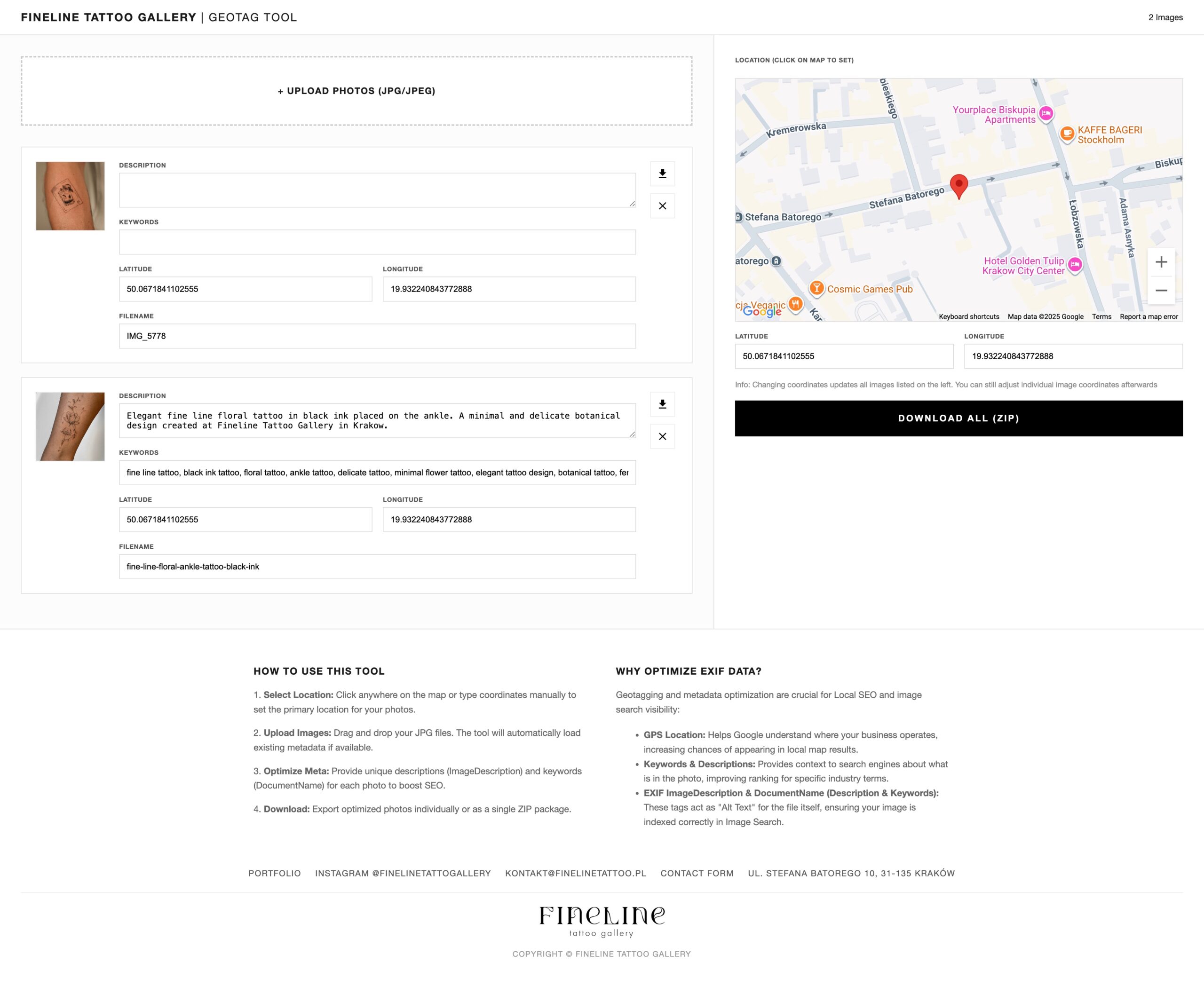
GeoTag Tool is a photo EXIF metadata editing tool that allows you to:
-
add GPS coordinates (latitude and longitude),
-
Complete the description of the photo,
-
add keywords,
-
Save the changes directly to the JPG / JPEG file,
-
Download images individually or as a ZIP package.
Unlike descriptions added in the CMS, this information remains on file, regardless of where it is published.
Why is EXIF metadata of images important for SEO?
To search engines, an image is not just an image, but a data file that must be interpreted.
EXIF metadata provides information about:
-
locations,
-
photo subject,
-
business context.
EXIF highlights:
-
GPS Location – physically linking a photo to a location,
-
Description – description of the contents of the photo,
-
Keywords – keywords describing the topic.
This data increases the chance of better visibility in Google Images and local results.
How does GeoTag Tool affect Local SEO?
1 GPS location
Adding GPS coordinates:
-
helps Google associate an image with a specific location,
-
Strengthens the local context of the site,
-
Increases data consistency between the image, page and Google business card.
This is especially important for companies operating locally.
2. description and keywords saved in the file
GeoTag Tool allows you to add a description and keywords directly to a photo, which:
-
provides the search engine with additional context,
-
complements the classic alt text,
-
increases the chances of displaying images in an image search engine.
Who is the GeoTag Tool for?
This tool is not limited to one industry. It will work well wherever images are part of business communications.
GeoTag Tool is useful for:
-
local service companies,
-
restaurants and cafes,
-
hotels and apartments,
-
beauty and wellness salons,
-
marketing agencies,
-
freelancers,
-
stationary stores,
-
web developers.
If you operate locally and publish photos – geotagging and metadata are of real importance.
How does the free GeoTag Tool work?
The process is simple and quick:
-
Upload photos (JPG / JPEG).
-
You select a location on the map or enter GPS coordinates.
-
You add a description and keywords to each photo.
-
You download the optimized files – either individually or as a ZIP.
The whole thing is done online, with no login and no cost.
Why did we create the GeoTag Tool?
The reason was simple:
images are often well done visually, but completely overlooked in SEO strategy.
GeoTag Tool was developed as:
-
free tool,
-
simple to use,
-
technically correct,
-
Realistically supporting the visibility of images in Google.
When does geotagging photos make the most sense?
-
When you run a local business,
-
When you care about visibility in Google,
-
When you publish a lot of photos,
-
When you treat SEO comprehensively, not just textually.
Geotagging is not a “trick” but part of sound technical optimization.
Summary
The free GeoTag Tool for images enables:
-
adding GPS location,
-
completing the description and keywords,
-
Writing metadata directly to the file,
-
Improving the visibility of images in Google.
If images are part of your online strategy, it’s worth making sure they are understandable to search engines as well.
👉 Use the free GeoTag Tool:
https://finelinetattoo.pl/tools/geotag/